
Reporting

Track outreach performance across campaigns and senders.

BriskReach reporting gives teams a practical view of campaign activity, sender performance, replies, and workspace readiness.

BriskReach product guideLast updated June 2026BriskReach product team

What team analytics does in BriskReach

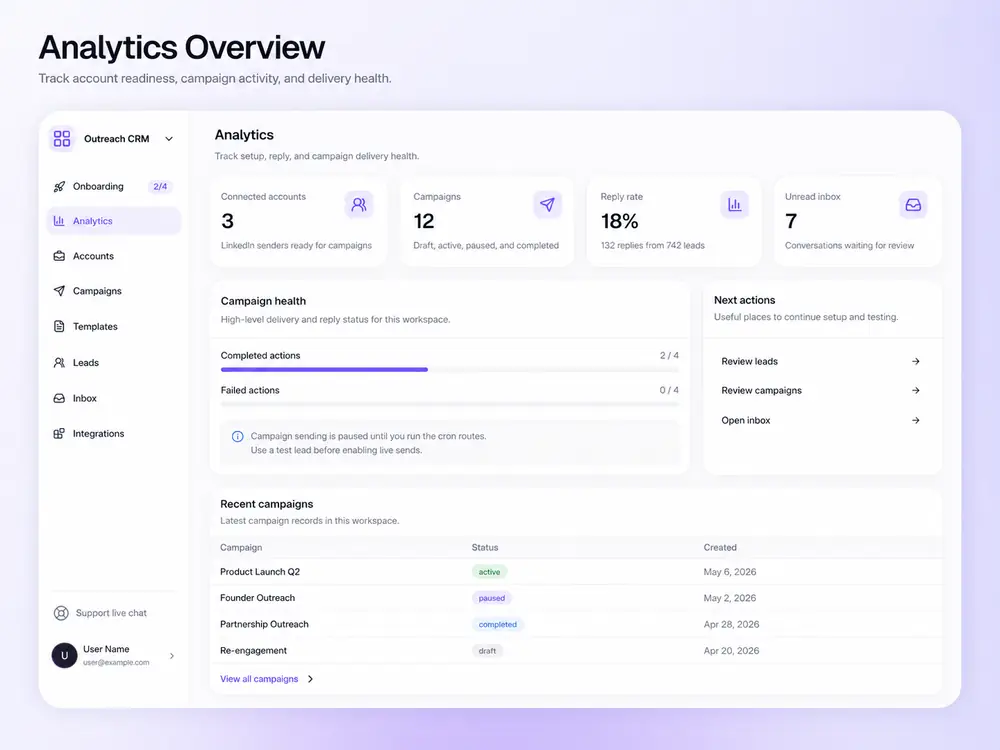
Team analytics in BriskReach gives teams an operational view of LinkedIn outreach activity, sender performance, campaign progress, reply rate, unread inbox state, and workspace readiness. The goal is not vanity reporting. It is to help users notice blockers, review campaign health, and decide what to fix before scaling. The best use of the page is operational diagnosis: understand whether sends, replies, failures, and account readiness support the next campaign decision.

What analytics covers

  • Campaign counts, connected accounts, reply rate, and unread inbox status.
  • Progress views for completed and failed campaign actions.
  • Breakdowns by sender and campaign when data is available.
  • Metrics based on recorded campaign events, not invented estimates.
Analytics dashboard in BriskReach

Who this is for

Common teams and workflows where team analytics becomes useful.

A manager checks campaign health

Before adding more leads or senders, a manager can review connected account count, active campaigns, reply rate, unread conversations, and recent campaign progress. That makes analytics part of the operating loop rather than a separate report after the fact.

A team investigates failed or stalled work

If outreach slows down, analytics and campaign progress views help the team inspect failures, sender readiness, or account constraints. The page should set the expectation that reporting is used to find operational issues, not to hide them.

Example scenario

Example scenario: a campaign stalls before the next send

A manager sees fewer completed actions than expected, checks campaign progress, and reviews sender readiness. The issue may be working hours, a daily cap, a disconnected account, or failed actions that need inspection before the team adds more leads. Instead of simply increasing volume, the team uses analytics to find the constraint and fix the operating problem first.

How BriskReach handles it

Product details, stored context, and limits that keep the workflow clear.

What BriskReach checks or stores

BriskReach reporting is based on recorded campaign events and workspace data. Counts such as connected accounts, campaign status, completed actions, failed actions, replies, and unread inbox state help teams understand what the system has actually observed.

  • Progress views separate completed and failed actions.
  • Recent campaigns include status and creation context.
  • Reply and inbox metrics help prioritize manual follow-up.

Limits and safety notes

Sender analytics are useful only when they stay tied to safety and readiness. A sender with low activity may be outside working hours, warming up, cooling down, disconnected, or limited by plan capacity. The content should teach users to interpret the number before changing volume, because a low count can indicate a useful safety stop rather than a broken campaign.

  • Workspace readiness matters before scaling.
  • Failures should be reviewed before reruns.
  • Performance views do not expose raw provider account IDs in public copy.

What to review before changing volume

Analytics should guide the next operational move, not just decorate a dashboard. Before adding leads, senders, or campaign steps, teams should review whether replies are being handled, failed actions are understood, and connected accounts are ready. The useful question is what constraint the data reveals. That keeps reporting tied to operating decisions instead of static screenshots.

  • Investigate failed or stalled actions before rerunning a campaign.
  • Review unread inbox state before adding more outbound activity.

Where it fits in the workflow

How teams use the data

  1. 1Check workspace readiness before scaling.
  2. 2Review sender and campaign health.
  3. 3Inspect failures before rerunning or changing a campaign.
  4. 4Use reply and booked-call context to decide what to prioritize next.
Safety and limits

Operational reporting, not vanity math

  • Analytics reflect available workspace data.
  • The page does not expose raw provider account IDs in user-facing copy.
  • Performance views should guide campaign review rather than hide safety blockers.

See team analytics inside a real workspace.

Connect one account, import a focused list, and review how BriskReach handles limits, replies, and campaign setup before you scale.