
Account setup

Multi-account outreach without profile switching.

Connect several LinkedIn sender accounts in one workspace, assign them to campaigns, and keep lead history in BriskReach instead of scattered across browser sessions.

BriskReach product guideLast updated June 2026BriskReach product team

What multi-account outreach does in BriskReach

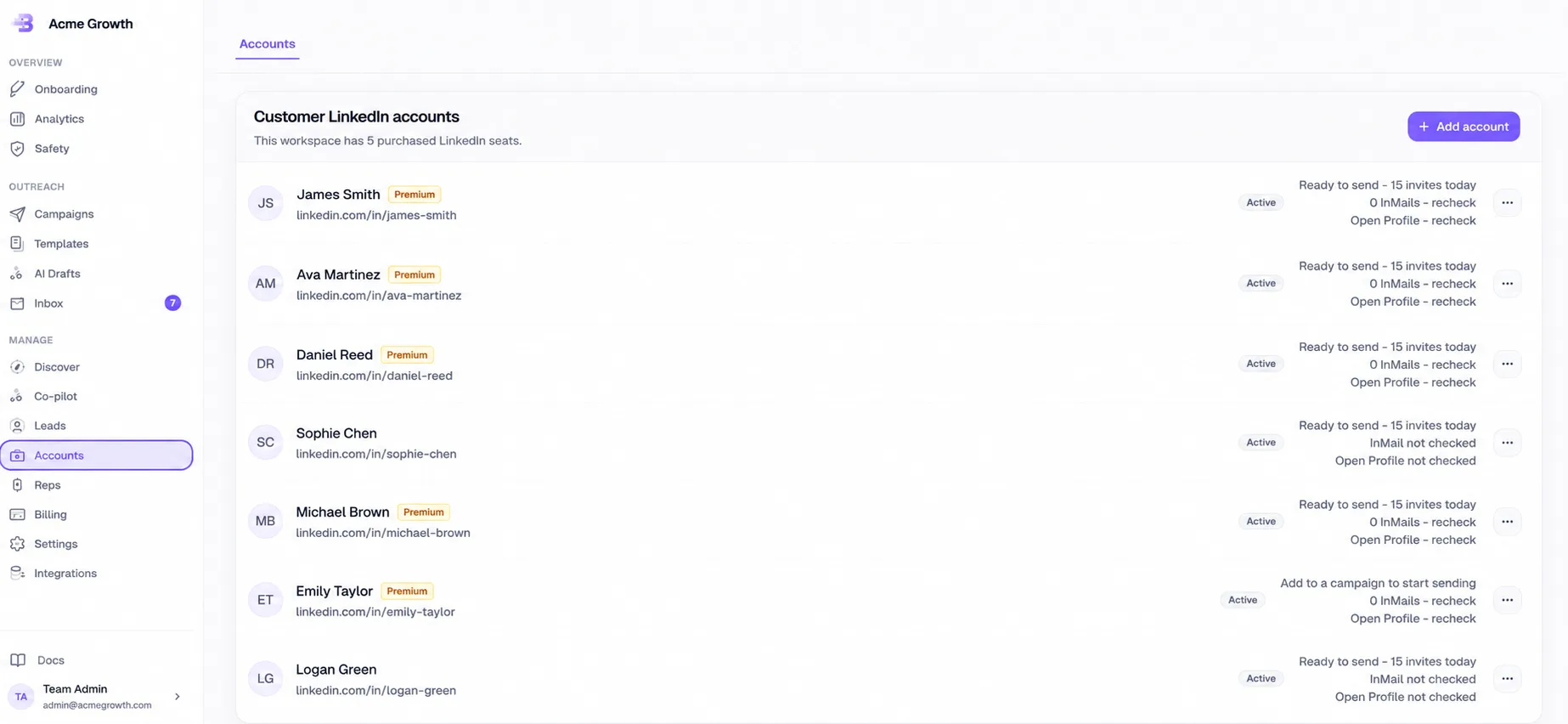
Multi-account outreach in BriskReach lets a team run LinkedIn campaigns from several connected sender accounts while keeping campaign setup, lead history, reply handling, and safety controls in one workspace. It is built for teams and agencies that do not want one profile carrying every invite, message, or InMail action, and it keeps sender capacity visible before a campaign is activated. The page is most useful when a buyer is comparing single-account tools against a shared workspace that can coordinate customer accounts and managed Rep capacity together.

What the team can control

  • Multiple connected accounts can live in one workspace for team and agency use.
  • Campaigns can use one or more eligible sender accounts instead of forcing one profile to carry every action.
  • Lead history, campaign status, and replies stay attached to the workspace when accounts reconnect.
  • Managed Reps can be added as paid sender capacity when a team needs more outbound volume.
Connected LinkedIn sender accounts in the BriskReach workspace

Who this is for

Common teams and workflows where multi-account outreach becomes useful.

A team needs more sender coverage

A small sales team can connect multiple active LinkedIn accounts, assign the right senders to a campaign, and keep every lead in the same workspace CRM. The team can review which accounts are eligible before launch instead of splitting work across browser sessions or spreadsheets.

An agency adds managed Rep capacity

When the team's own accounts are not enough, BriskReach can add paid managed Reps as sender capacity. Those Reps still run through the same campaign controls, safety checks, inbox handling, and reporting surface instead of becoming a separate operating process.

Example scenario

Example scenario: an agency campaign with five senders

An agency imports a reviewed lead list for a client, assigns three customer-owned accounts and two managed Reps, then checks sender readiness before activation. BriskReach keeps the lead list, sender assignment, replies, and campaign status in the same workspace, so the agency can scale capacity without splitting reporting across separate LinkedIn profiles. If one sender needs to pause or cool down, the campaign context remains visible and the team can decide whether to redistribute untouched leads or leave current ownership alone.

How BriskReach handles it

Product details, stored context, and limits that keep the workflow clear.

What BriskReach checks or stores

The value is not only having more accounts. BriskReach keeps lead records, sender assignment, campaign state, reply status, and analytics attached to the workspace. That matters when an account reconnects, a sender cools down, or a team changes which accounts should receive new leads.

  • Lead lists stay in BriskReach even when sender accounts change.
  • Campaign setup shows sender choices before activation.
  • Replies and CRM status remain visible to the team.

Limits and safety notes

Multi-account outreach is not a shortcut around LinkedIn limits. Each sender keeps its own working hours, warmup curve, and daily cap checks. The scheduler reviews sender readiness before actions are queued, so adding accounts increases managed capacity without removing the account-level guardrails.

  • Cooling-down accounts do not receive fresh lead assignments.
  • Trial and plan limits still apply to campaign volume.
  • Sender activity is recorded so teams can review outcomes later.

What to review before adding capacity

Before adding more senders, teams should review whether the current bottleneck is account capacity, lead quality, reply handling, or campaign copy. BriskReach makes sender capacity visible, but more accounts only help when the team can also review replies, keep lists clean, and maintain consistent message quality.

  • Use analytics and inbox state to confirm that added capacity is useful.
  • Check whether managed Reps or customer-owned accounts are the right fit.

Where it fits in the workflow

How it fits into a campaign

  1. 1Connect or add sender accounts.
  2. 2Import or discover a reviewed lead list.
  3. 3Choose sender accounts during campaign setup.
  4. 4Let the scheduler check sender readiness before each action is queued.
Safety and limits

Safety boundaries

  • Each sender keeps its own working hours, warmup, and daily limits.
  • Cooling-down accounts can stay attached for existing leads but do not receive new lead assignments.
  • BriskReach does not ask visitors to share a LinkedIn password in the public product flow.

See multi-account outreach inside a real workspace.

Connect one account, import a focused list, and review how BriskReach handles limits, replies, and campaign setup before you scale.