Sender assignment

Rotate outreach across eligible senders.

BriskReach distributes campaign work across assigned sender accounts so outreach does not depend on a single profile carrying the whole list.

BriskReach product guideLast updated June 2026BriskReach product team

What sender rotation does in BriskReach

Sender rotation in BriskReach distributes campaign work across eligible assigned sender accounts. It helps teams avoid depending on one LinkedIn profile for the whole list while keeping assignment, readiness checks, and daily limits visible. Rotation is capacity-aware, which means accounts that cannot take new leads are skipped for new assignment. The feature is best understood as assignment control, not a promise of unlimited volume, because every sender still has its own operational state.

What rotation protects

  • Campaigns can include multiple sender accounts.
  • Each lead stores the sender account responsible for its outreach.
  • The scheduler checks account readiness before queueing actions.
  • Accounts that cannot take new leads are skipped for new assignment.
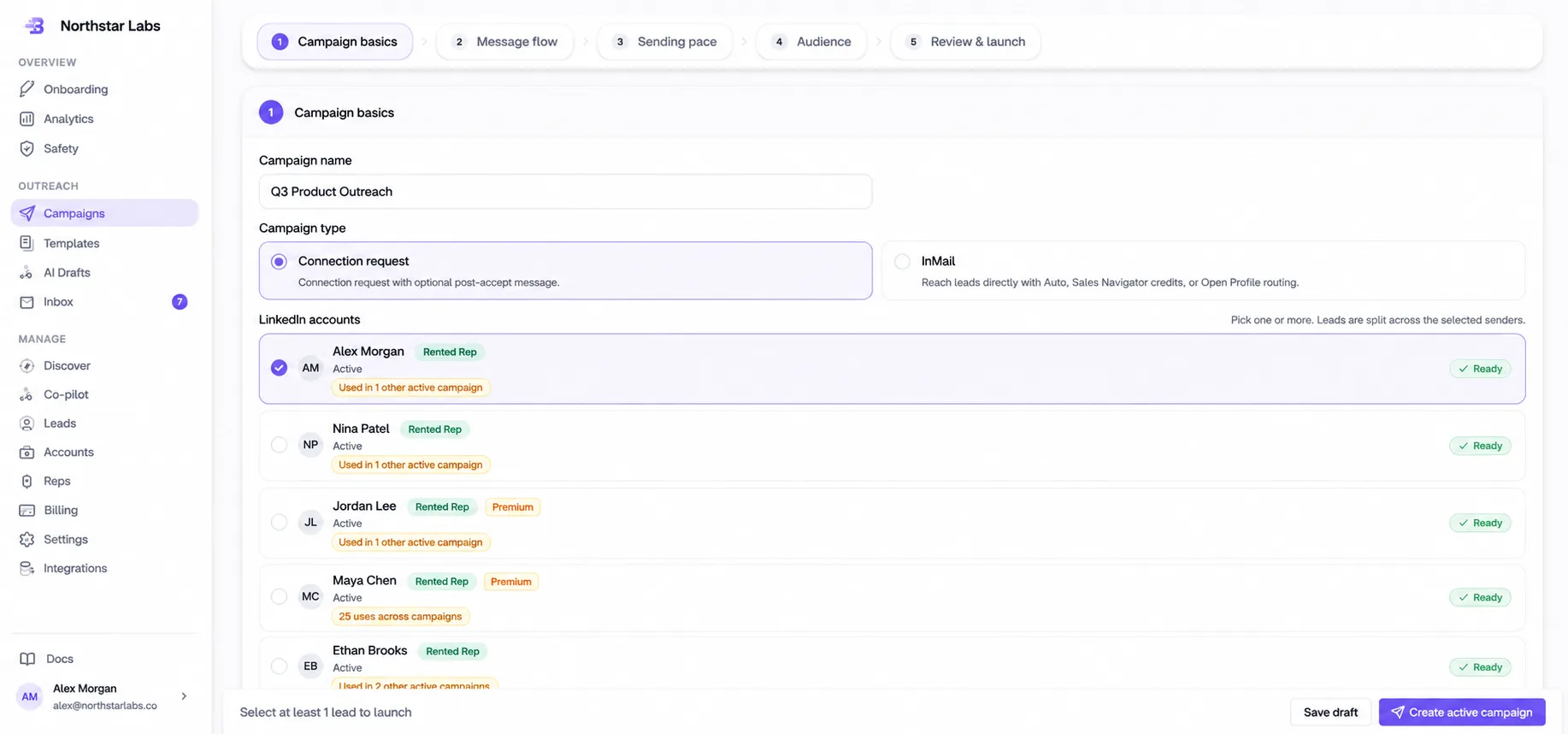
Assigning multiple sender accounts to a campaign in BriskReach

Who this is for

Common teams and workflows where sender rotation becomes useful.

A campaign has more leads than one account should carry

When a campaign has a larger reviewed list, sender rotation lets the team assign multiple operational accounts. BriskReach can then spread new untouched leads across eligible senders instead of pushing every action through the same profile.

A sender needs to cool down without losing history

If an account is cooling down or finishing existing work, the team can keep that sender attached for leads already assigned to it while preventing new lead assignment. That keeps historical ownership stable without sending fresh work to a sender that should slow down.

Example scenario

Example scenario: one sender cools down mid-campaign

A campaign has three sender accounts. One sender enters a cooldown state, so BriskReach keeps that sender attached to existing assigned leads but skips it for new lead assignment. Fresh untouched leads continue through eligible accounts, and the team can decide later whether to redistribute or leave ownership stable. This prevents a stale edit page or a rushed sender change from quietly pushing new work to an account that should not receive it.

How BriskReach handles it

Product details, stored context, and limits that keep the workflow clear.

What BriskReach checks or stores

Rotation starts with the sender accounts selected during campaign setup or edit. BriskReach checks whether each account is active, operational, and allowed to receive new leads. New or reassigned leads only go to senders that pass those rules, while existing assigned leads can stay stable unless the user chooses redistribution.

  • Untouched leads can be assigned to eligible operational senders.
  • Existing lead ownership is not changed casually.
  • Sender add and remove choices stay explicit in campaign setup.

Limits and safety notes

Rotation is not a volume hack. It does not bypass daily caps, warmup, working hours, or plan limits. It is a scheduling and assignment control that helps distribute work across available accounts while preserving the per-account safety model.

  • Daily caps remain per sender.
  • Warmup still starts low and ramps gradually.
  • Provider details stay behind the LinkedIn adapter.

What to review before redistribution

Redistribution should be a deliberate operational choice. If a sender cools down, the team can leave existing ownership stable, move untouched leads, or adjust future sender assignment. The right choice depends on reply history, account health, and whether a lead has already seen outreach from a specific profile.

  • Keep assigned leads stable when continuity matters.
  • Move only untouched leads when the goal is cleaner capacity planning.

Where it fits in the workflow

How sender selection works

  1. 1Choose sender accounts during campaign setup or edit.
  2. 2Assign untouched leads to eligible operational senders.
  3. 3Schedule actions account-first based on remaining capacity.
  4. 4Keep existing assigned leads stable unless a user chooses to redistribute.
Safety and limits

Limits remain per account

  • Rotation does not bypass daily caps or warmup.
  • Cooling-down accounts do not receive fresh leads.
  • Provider details stay behind the LinkedIn adapter, not inside feature code.

See sender rotation inside a real workspace.

Connect one account, import a focused list, and review how BriskReach handles limits, replies, and campaign setup before you scale.