
Safety engine

Daily caps and warmup are built into scheduling.

BriskReach starts sender activity low, raises volume gradually, and enforces hard daily limits before campaign actions are queued.

BriskReach product guideLast updated June 2026BriskReach product team

What daily caps & warmup does in BriskReach

Daily caps and warmup controls in BriskReach keep LinkedIn campaign activity paced before actions are queued. The scheduler checks sender readiness, working hours, warmup state, remaining daily capacity, and timing controls so teams can scale outreach with visible limits instead of sudden spikes from one account. This is especially important for teams running several campaigns at once, because capacity is shared by sender account rather than treated as a separate allowance for every campaign.

What the safety engine checks

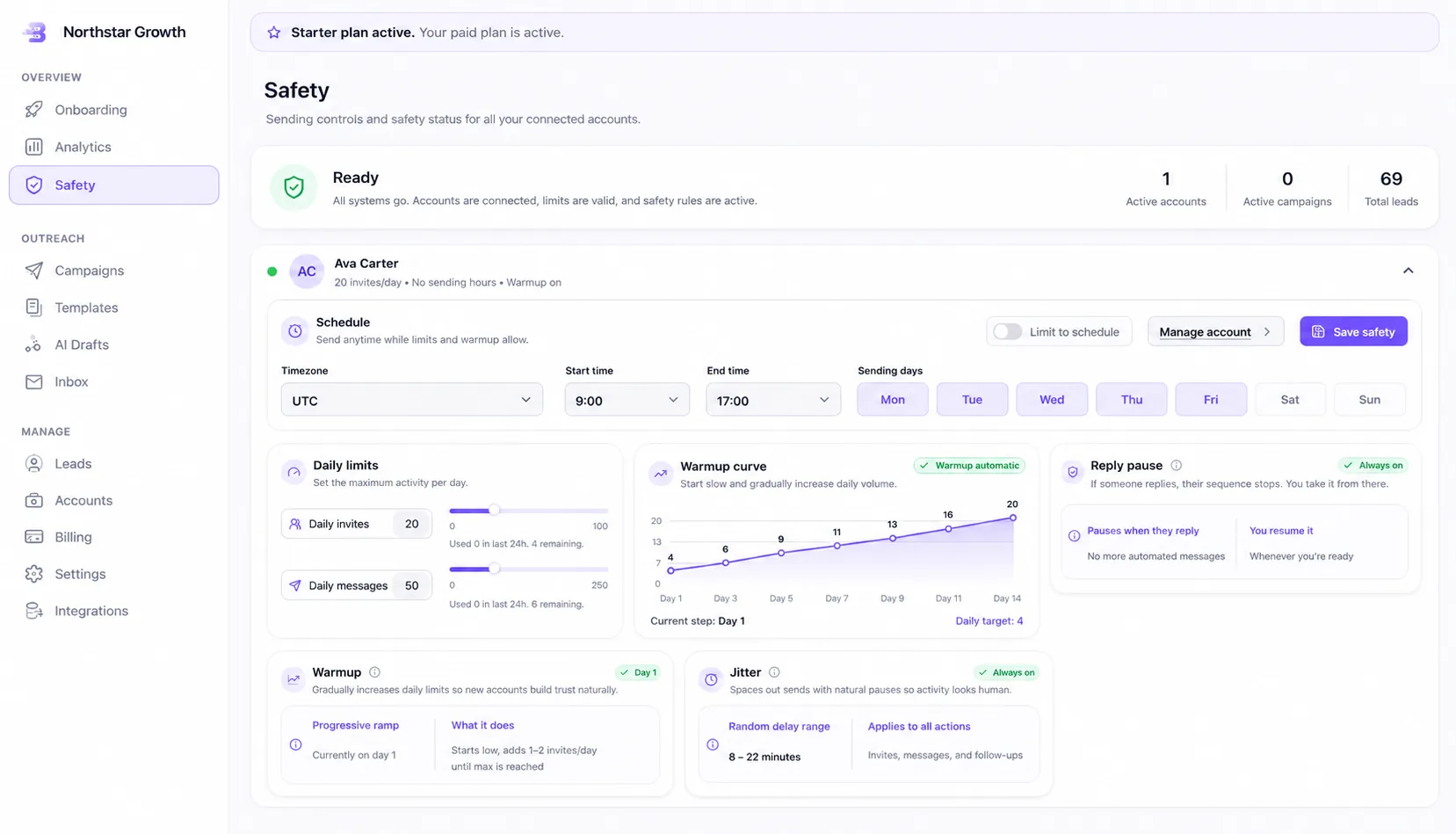
  • Warmup begins at low daily volume and ramps from real campaign sends.
  • Daily invite and message caps are enforced per sender.
  • Working hours restrict sending to the sender account's timezone window.
  • Jitter spreads scheduled actions instead of firing them all at once.
BriskReach safety controls with daily limits and warmup curve

Who this is for

Common teams and workflows where daily caps & warmup becomes useful.

A new sender starts with controlled activity

When a connected account is new to campaign sending, BriskReach can begin at low daily volume and build gradually from real campaign activity. That gives the team a safer ramp than immediately asking a sender to handle a full lead list.

A team needs predictable account-level limits

Teams running multiple campaigns can use daily caps and working hours to keep sender activity within known boundaries. Before actions are scheduled, BriskReach checks the account's remaining capacity instead of assuming every active campaign can send at once.

Example scenario

Example scenario: a sender reaches the daily invite cap

A campaign still has untouched leads, but one sender has reached the configured invite limit for the day. BriskReach skips fresh actions for that sender until capacity is available again, while other eligible senders can continue if they still have remaining limits and pass readiness checks. The campaign does not need to be rebuilt just because one account is temporarily out of capacity.

How BriskReach handles it

Product details, stored context, and limits that keep the workflow clear.

What BriskReach checks or stores

The safety engine sits before campaign action execution. A scheduler tick reviews active campaigns, sender readiness, the sender's timezone window, daily invite or message capacity, and jitter timing. Eligible actions are queued only after those checks pass.

  • Working hours restrict sends to the sender's configured window.
  • Jitter spreads scheduled actions instead of stacking them together.
  • Outcomes are recorded for analytics and troubleshooting.

Limits and safety notes

Caps reduce risky volume, but no software can guarantee that a LinkedIn account will never be restricted. The page should make that clear. BriskReach gives teams controls for pacing and visibility, while users remain responsible for audience quality, message quality, and account behavior.

  • Plan and trial limits still apply.
  • Users can pause campaigns before scaling further.
  • Sender health review matters as much as raw volume.

What to review before scaling volume

Warmup is useful only when the surrounding campaign is healthy. Before raising volume, teams should review reply quality, failed actions, sender readiness, working-hour coverage, and whether the lead list still matches the audience. BriskReach exposes the checks, but the operating decision stays with the user.

  • Treat low volume as a prompt to inspect readiness before overriding settings.
  • Raise limits gradually after reviewing sender and campaign outcomes.

Where it fits in the workflow

Where limits apply

  1. 1A scheduler tick reviews active campaigns.
  2. 2Sender readiness and remaining daily capacity are checked.
  3. 3Eligible actions are queued with timing controls.
  4. 4The worker records outcomes for analytics and troubleshooting.
Safety and limits

Safety without impossible promises

  • Caps reduce risky volume, but no tool can guarantee a LinkedIn account will never be restricted.
  • Users can pause campaigns and adjust sender settings before scaling.
  • Trial and plan limits still apply to campaign volume.

See daily caps & warmup inside a real workspace.

Connect one account, import a focused list, and review how BriskReach handles limits, replies, and campaign setup before you scale.