
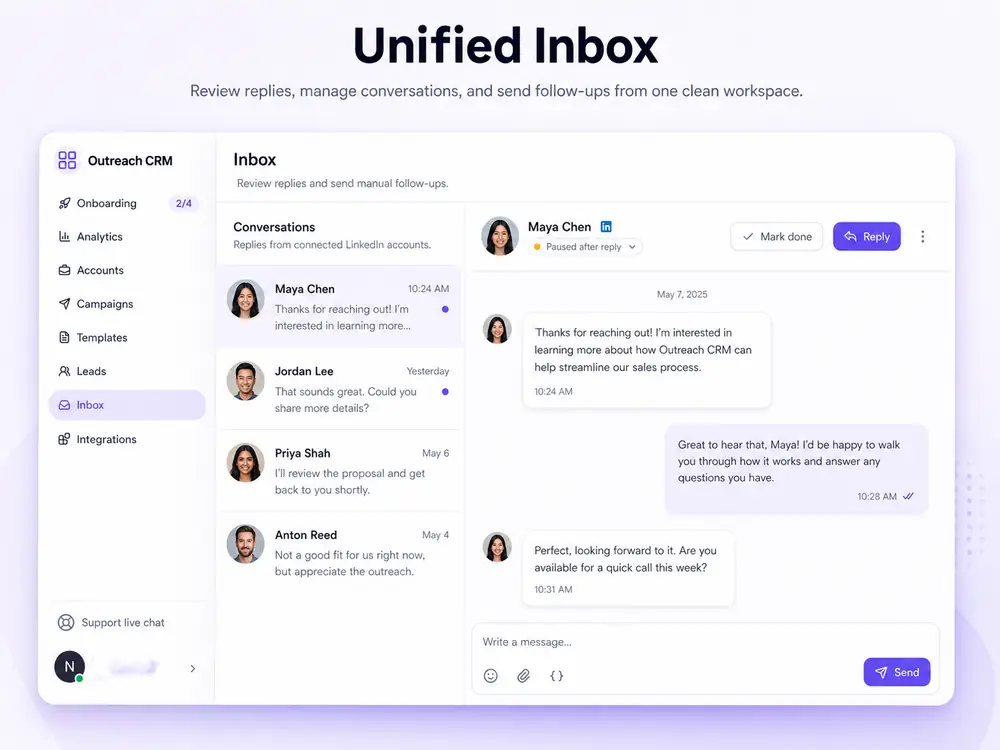
Reply handling

One inbox for every sender account.

Replies from connected accounts land in one workspace inbox so the team can handle interested prospects without logging into each LinkedIn profile.

BriskReach product guideLast updated June 2026BriskReach product team

What unified inbox does in BriskReach

The unified inbox gives the team one place to review LinkedIn replies from connected sender accounts. Instead of checking each profile separately, users can see unread conversations, lead context, and the sender account tied to the thread. When a prospect replies, BriskReach marks the lead as replied and pauses future campaign automation for that lead. That makes the inbox both a response queue and a safety checkpoint, because interested prospects stop receiving scheduled campaign touches once they answer.

What reply teams see

  • Conversation threads are grouped by lead across sender accounts.
  • Unread states show which conversations need attention.
  • Lead status changes when inbound replies arrive.
  • Manual replies can be handled from active connected accounts.
Unified inbox in BriskReach

Who this is for

Common teams and workflows where unified inbox becomes useful.

A rep handles replies from several senders

A team member can review conversations without switching LinkedIn profiles. The inbox groups the thread around the lead, so the person replying can see the context that matters before deciding whether to answer, update status, or move the prospect into a follow-up workflow.

A manager watches response handling

Managers can use unread states and campaign context to spot conversations that need attention. That is especially useful when multiple senders or managed Reps are running outreach and replies need to be handled before interested prospects go cold.

Example scenario

Example scenario: a prospect replies after a follow-up

A campaign sends a follow-up from one connected account, and the prospect answers with interest. BriskReach marks the conversation unread, moves the lead into a replied state, pauses future automation for that lead, and gives the team one inbox thread to review before sending a manual response. The rep can then look at the lead details, sender context, and prior campaign activity before deciding whether to book a call, ask a qualifying question, or mark the prospect as not a fit.

How BriskReach handles it

Product details, stored context, and limits that keep the workflow clear.

What BriskReach checks or stores

Inbound message events bring conversations back into the workspace. BriskReach marks the thread unread, updates the lead state, and keeps the sender context attached. The inbox is meant for review and response handling, so the team can decide what to do next instead of letting automation continue blindly.

  • Unread states show which conversations need review.
  • Lead context stays connected to the campaign and sender.
  • Reply status gives the team a clean handoff point.

Limits and safety notes

Reply-aware safety is a core trust signal on the page. A reply is not treated as just another analytics event. It changes the lead state and stops future campaign automation for that lead, which helps prevent awkward follow-ups after someone has already answered.

  • Campaign automation pauses for the replied lead.
  • Manual response remains a human workflow.
  • Teams can add email or channel alerts for new replies.

What to review before handoff

A shared inbox works best when the team decides who owns each response path. BriskReach can surface unread threads and sender context, but the team still needs a clear process for qualification, meeting booking, disqualification, and escalation. That keeps replies from becoming another scattered queue.

  • Decide who reviews new unread conversations each day.
  • Use lead and campaign context before sending manual responses.

Where it fits in the workflow

How replies move through BriskReach

  1. 1A campaign sends from an assigned sender account.
  2. 2Inbound message events mark the conversation unread.
  3. 3The lead moves into a replied state for follow-up.
  4. 4The team reviews the thread from the shared inbox.
Safety and limits

Automation stops when people answer

  • Reply detection pauses future automation for that lead.
  • The inbox is for response handling, not automatic AI sending.
  • Teams can add email or channel notifications for new replies.

See unified inbox inside a real workspace.

Connect one account, import a focused list, and review how BriskReach handles limits, replies, and campaign setup before you scale.