Messaging

Draft follow-ups that still require human review.

BriskReach helps teams create reusable message drafts and templates, then keeps review in the workflow before copy is used in a campaign.

BriskReach product guideLast updated June 2026BriskReach product team

What smart follow-ups does in BriskReach

Smart follow-ups in BriskReach help teams draft, edit, save, and reuse LinkedIn follow-up copy without giving AI permission to send on its own. Draft support is built around review: users provide audience, offer, goal, and tone, then edit the message before it becomes a reusable template inside a campaign. The feature is useful when a team wants faster copy creation but still needs human judgment around claims, personalization, and timing.

What draft support includes

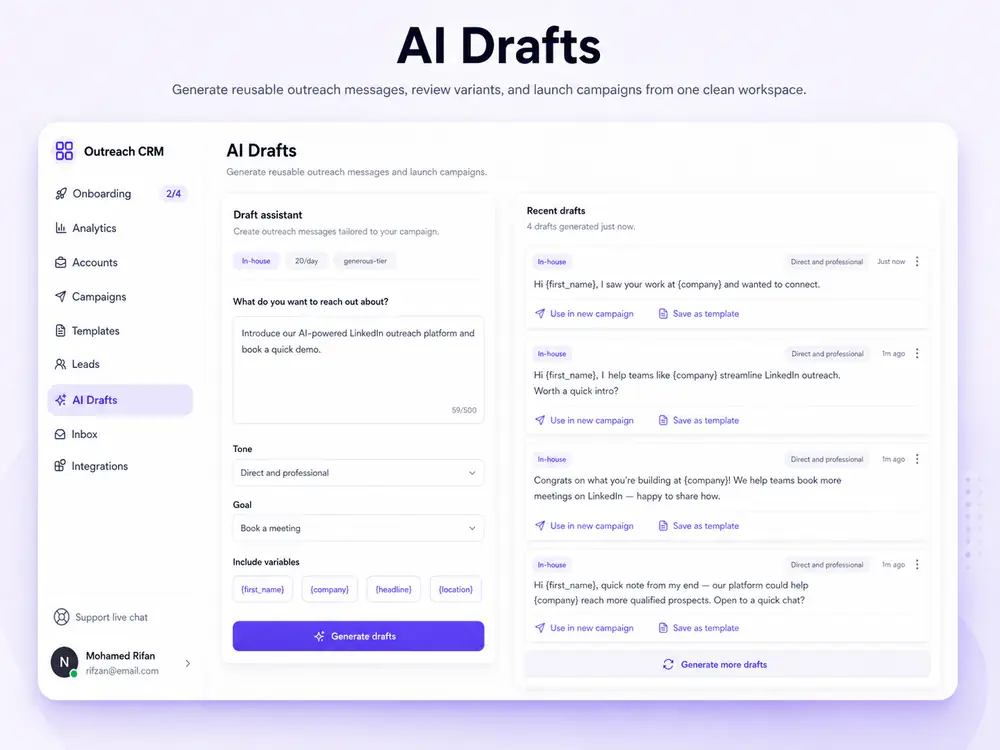
  • AI campaign drafts can start from audience, offer, goal, and tone.
  • Templates support variables such as first name, company, headline, and location.
  • Saved copy can be reused across future templates and campaigns.
  • Warnings help avoid fake personal claims or unsupported language.
AI campaign draft assistant in BriskReach

Who this is for

Common teams and workflows where smart follow-ups becomes useful.

A team needs a reusable first follow-up

Instead of writing one-off copy for every campaign, a team can create a starting draft, review it, add supported variables, and save it as a template. That gives future campaigns a consistent baseline while still leaving room for human editing.

A manager wants safer message quality

AI-assisted drafts can help avoid blank-page work, but the review step is the important control. Teams can remove unsupported claims, adjust tone, and confirm that variables such as company or headline resolve from actual lead data.

Example scenario

Example scenario: turning a rough offer into a reusable template

A user enters the audience, offer, goal, and tone for a campaign. BriskReach generates a starting draft, the user removes claims that are not supported by the lead data, checks variables, and saves the edited message as a template for campaign setup. The draft becomes reusable only after the user approves it, which keeps the final campaign copy accountable to the team.

How BriskReach handles it

Product details, stored context, and limits that keep the workflow clear.

What BriskReach checks or stores

Draft support begins with campaign context and ends with reviewed copy. A user can generate or write a starting message, edit it, check variables, and save the result as a template. That template can then be selected during campaign setup.

  • Supported variables include first name, company, headline, and location.
  • Saved copy can be reused across future campaigns.
  • Previewing variables helps catch awkward personalization before launch.

Limits and safety notes

The page should be blunt about the boundary. AI draft support does not send LinkedIn messages automatically, does not reply to prospects on its own, and does not replace manual review. It helps create copy that a user decides whether to use.

  • Campaign activation remains user controlled.
  • Manual replies stay manual unless a user sends a response.
  • Warnings help avoid fake personal claims or unsupported language.

What to review before saving templates

A good follow-up template needs more than polished language. Teams should check whether the message matches the audience, avoids unsupported personalization, uses only available variables, and still sounds natural when fields are missing. BriskReach helps draft and reuse copy, but review is what makes the template reliable.

  • Preview variable output before the template reaches a campaign.
  • Remove claims that cannot be supported by the lead record.

Where it fits in the workflow

How copy moves into a campaign

  1. 1Generate or write a starting draft.
  2. 2Edit the copy and check variables.
  3. 3Save the message as a template.
  4. 4Use the reviewed template inside campaign setup.
Safety and limits

AI does not send on its own

  • AI draft support does not send messages automatically.
  • Templates are reviewed before campaign activation.
  • Reply handling remains manual unless a user explicitly sends a response.

See smart follow-ups inside a real workspace.

Connect one account, import a focused list, and review how BriskReach handles limits, replies, and campaign setup before you scale.