
Turn Sales Navigator links into real LinkedIn profiles
Sales Navigator lead URLs are locked behind your account and useless to anyone else. Paste them here and get clean linkedin.com/in profile links your whole team can open. One at a time or hundreds at once.
Everything runs on your device. No login, no email, and nothing is sent to a server or to LinkedIn.
What a Sales Navigator URL actually is
When you open a person in Sales Navigator, the link in your browser is not their real profile. It is a lead URL tied to your seat, with the LinkedIn member ID buried in the middle.
Sales Navigator lead URL
linkedin.com/sales/lead/ACwAAAMY6o4BRAt8sl4YCeM6U4_bXVB2DBb44ul,NAME_SEARCH,abcd
Public profile URL the converter returns
linkedin.com/in/ACwAAAMY6o4BRAt8sl4YCeM6U4_bXVB2DBb44ul/
Sales Navigator URL
- Opens only inside your own Sales Navigator seat
- Breaks when shared with a teammate
- Rejected by most CRMs and enrichment tools
Public LinkedIn URL
- Opens for anyone, signed in or not
- Imports cleanly into a CRM or outreach tool
- Stays usable in a spreadsheet for any teammate later
How to copy a Sales Navigator lead URL
The link you need sits in your browser bar while a single lead is open. Here is exactly where to find it.
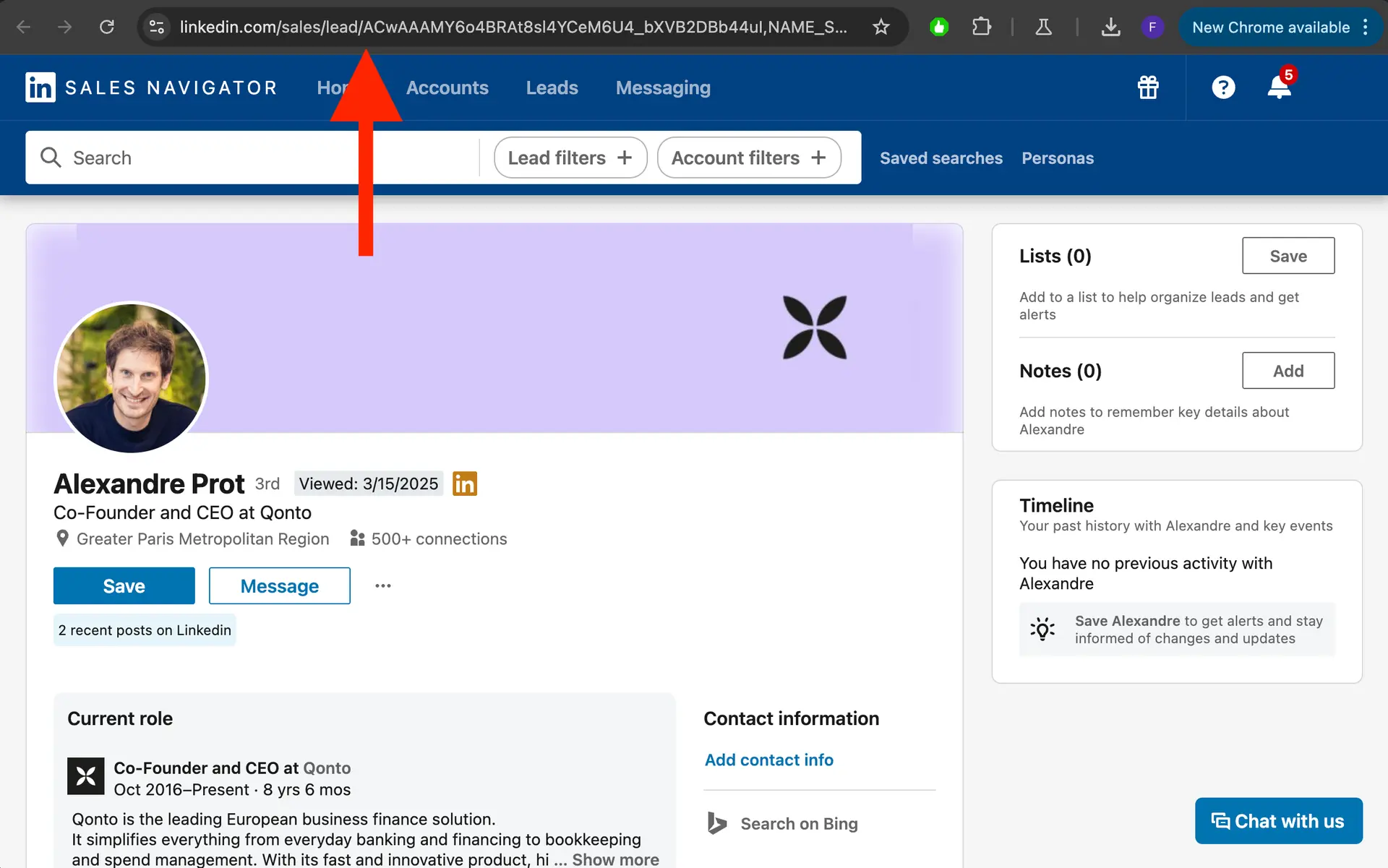
- 1
Open a single lead in Sales Navigator
From a search or a saved list, click into one person so their full lead profile loads. The converter needs a single lead page, not a search or list view.
- 2
Copy the URL from your browser bar
Click the address bar, select the whole link, and copy it. It starts with linkedin.com/sales/lead/ followed by a long member ID and a few comma-separated tags.
- 3
Paste it above and convert
Drop the link into the box and hit Convert. You get a clean linkedin.com/in/ profile link back, ready for your CRM, a campaign, or an enrichment tool.
What the converter does behind the scenes
Three things worth knowing before you paste a batch.
It reads the member ID
Every Sales Navigator lead URL holds a member ID before the first comma. The tool grabs that ID and rebuilds it as a public linkedin.com/in/ link in one click.
Single lead URLs only
Search and list URLs carry no member ID, so there is nothing to map. Open a single lead first, then copy that URL and drop it in.
The slug is not fetched
Output is the member-id /in/ link. LinkedIn usually redirects it straight to the real profile, and the tool never looks up the vanity slug or touches a server to do it.
Why convert Sales Navigator URLs
A locked lead URL is a dead end the moment it leaves your seat. Public profile links keep the prospect usable everywhere else you work.
Import clean leads into your CRM
Most CRMs and enrichment tools reject /sales/lead/ links because they are locked to your seat. Public /in/ URLs map cleanly to a contact record.
Load prospects into outreach campaigns
BriskReach and other outreach tools run on public profile URLs. Convert first, then import a focused list and start a connection or InMail sequence.
Share profiles with your team
A Sales Navigator link opens only for the person who owns the seat. A public link opens for everyone, so handoffs and reviews stop breaking.
Keep a portable lead spreadsheet
Store public URLs in a sheet and they stay usable for any teammate or tool later, not just inside one Sales Navigator account.
FAQ
Quick answers before you paste a batch.
Run safer LinkedIn outreach from one place.
Connect a LinkedIn account, import a focused lead list, and keep reply handling visible from the first campaign.
Invite warmup
1 → 10 / day